The Part-Time CUI Enclave: How Small Businesses Do L2 Without Enterprise IT
You don't secure the whole company. You build one small, contained environment where CUI lives — and then you work a mapped task list around your actual job.
By Rob Maupin, founder of Overwatch Tools and author of the CMMC Practical Guides series — Volume 1 · Level 1 and Volume 2 · Level 2
The four previous pieces in this series were about Level 1. A contractor who handles Federal Contract Information (FCI) now has the whole method in front of them: where to start, what the artifact map looks like, how the configuration work gets done, and what a finished package physically is.
This one is for a different reader. You handle Controlled Unclassified Information (CUI) — or a prime just told you that you do — and since July you've been carrying two questions at once:
"Does Level 2 even still apply to me?" and "What on earth is an enclave?"
Both are answerable in a few minutes, and the answers are better news than most contractors expect. Level 2 self-assessment did not go anywhere. And the reason small businesses can do it at all — without a domain controller, a security operations center, or a full-time security hire — is a single architectural decision made at the very beginning.
First: L2 Self-Assessment Is Still Live
The most damaging misread of the July 13 announcement is happening specifically among CUI handlers, and it goes like this: "Level 2 was the C3PAO level. C3PAO is suspended. So Level 2 is off."
That conflates two different things. Phase I — which took effect long before any of this — required self-assessments under both Level 1 and Level 2, and the Department's language was that Phase I requirements remain firmly in place. What Phase II would have added, starting November 10, 2026, was the mandatory third-party assessment for CUI handlers. That addition is what's suspended.
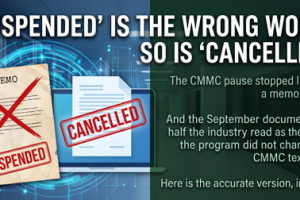
❌ Suspended
- The Phase II transition and its mandatory C3PAO assessment for many CUI handlers
- Phase III and its DIBCAC-led Level 3 assessments
- Pending CMMC implementation milestones across Department solicitations and contracts
✅ Still Firmly In Place
- Phase I self-assessment requirements — at Level 1 and Level 2
- DFARS 252.204-7012 — your contractual obligation to safeguard covered defense information
- NIST SP 800-171 — the standard the Department will enforce in the interim
- Select government-led assessments — explicitly retained
So the practical situation for a CUI handler in a self-assessment-eligible program is unchanged: you owe a Level 2 self-assessment, and the thing that would have made it more expensive got removed. We took this argument apart in detail in "L1/L2 Self-Assessment Is Now the Only Path" and "The Audit Went Away. The Obligation Didn't." — no need to rebuild it here.
Not sure whether any of this applies to you?
Thirty minutes is usually enough to sort out which level you're dealing with and what your boundary should look like. No cost, no obligation.
Book a Free 30-Minute Consultation"Do I Actually Handle CUI?"
This deserves a straight answer about who gets to give the answer: not us, and not a blog post. Whether a given contract puts CUI in your hands is a contractual and legal determination that comes out of your contract documents, your prime's flow-down, and the markings on what you receive. Anyone who tells you definitively from the outside is guessing.
What we can offer is orientation. The rough shape of the distinction:
- FCI — information provided by or generated for the government under a contract, not intended for public release. Delivery schedules, non-public contract correspondence, that class of thing. FCI triggers Level 1.
- CUI — information the government requires to be safeguarded or disseminated under a specific law, regulation, or policy. Technical drawings, specifications, and export-controlled technical data are common examples in defense work. CUI triggers Level 2.
The practical signals that you should be having this conversation: a DFARS 252.204-7012 clause in your contract, CUI markings on files a prime sends you, a prime's questionnaire asking about your NIST SP 800-171 posture, or drawings and specifications arriving in your inbox that plainly aren't public.
The FCI-versus-CUI line is genuinely one of the most consequential distinctions in this program, and it gets a full treatment — including how to tell which one you're actually holding — in CMMC Level 1: A Practical Guide for Small to Medium GovCon Contractors. That's the Level 1 volume, so it approaches the line from the FCI side — where most contractors are standing when they first ask the question. Volume 2 picks it up from the CUI side and treats the enclave scoping decision this article summarizes at full length.
💡 If you're not sure, find out before you build anything
Scoping errors are expensive in both directions — building an enclave you didn't need, or leaving CUI sitting on a general-purpose network you never brought into scope. A free 30-minute consultation is usually enough to sort out which level you're dealing with and what your boundary should look like. That conversation costs you nothing and routinely saves months.
The Enclave, in Plain Language
Here's the thing that makes Level 2 feasible for a small business, and it isn't a shortcut, a loophole, or a lite version of the requirements.
Level 2 is 110 practices across 14 domains. Those practices apply to whatever is in your assessment scope. The instinctive assumption — the one that makes contractors close the tab and go do something else — is that "in scope" means the company. Every laptop, every phone, every account, the shop network, the estimator's home office, the accounting system.
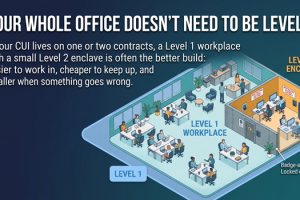
It doesn't have to. An enclave is a small, contained environment where CUI lives, and only that environment is in scope. A defined set of users. A handful of dedicated devices. One platform tenant configured for the purpose. CUI goes in there and stays in there. Everything outside stays outside.
Same 110 practices. Radically smaller thing to apply them to.
The requirement doesn't shrink. The thing you point it at does.
This is why "I don't have enterprise IT" stops being a blocker. You're not building security operations for a company. You're building it for a small, deliberately boring environment with a handful of users and a short list of devices — and the platform underneath it does most of the technical heavy lifting natively.
Scoping Is the Highest-Leverage Decision in All of Level 2
If there's one paragraph in this article worth re-reading, it's this one. The single biggest source of wasted Level 2 spend is bad scoping — money and months poured into hardening systems that never belonged in the boundary in the first place.
It happens because scoping feels like a preliminary step, so people rush it to get to the "real" work. Then they spend the next four months writing procedures for a file server that could have been declared out of scope on day one with a documented rule about where CUI is permitted to live.
Recall the numbers from the Small Business Administration's July analysis: total compliance costs can reach roughly $388,600 for firms eligible for self-assessment and roughly $593,800 per certification for firms requiring a third-party assessment. Those are upper-bound figures for total compliance cost — remediation, tooling, platform work, documentation, and internal labor — not assessment fees. And on the self-assessment side especially, that number is overwhelmingly labor: evenings, rework, documentation written three times, and scope that was never drawn tightly in the first place.
The through-line of this whole series
The expensive part of compliance was never the assessment. It was doing it without a map. At Level 1 the map is an artifact list. At Level 2 the map starts with a boundary — and every hour spent drawing that boundary correctly removes days of work downstream.
The Map at Level 2: 110 Practices → 182 Artifacts
Level 1 broke 15 practices into 142 checkable artifacts. Level 2 does the same thing at a larger scale: 110 practices across 14 domains, decomposed into 182 defined artifacts — roughly 176 files of policies, procedures, configuration guides, CSVs, templates, and evidence checklists.
The logic is identical to the Level 1 argument in Part 2: "implement AU.L2-3.3.1" is not a task anyone can act on. "Complete these six artifacts, here they are, here's what goes in each one" is a Tuesday afternoon. Volume was never what burned the hours. Ambiguity was.
The SSP, demystified
The System Security Plan is the document that scares people most, and it shouldn't. It is the document that describes your system: what's in the boundary, what's out, who the users are, what platform you're on, what each of the 110 requirements looks like in your specific environment, and who's responsible for it. That's the whole job. It's a description, not an exam.
What makes it feel impossible is authoring it from a blank page. Working from a pre-filled template inverts that: the structure, the standard language, and the control-by-control scaffolding are already there, and your work becomes editing to match reality — swapping in your platform, your boundary, your device list, your roles. Editing a document is a fundamentally different task than writing one, and it's the difference between a weekend and a season.
Alongside it: a POAM framework for tracking anything not yet fully implemented, a Risk Register, and an evidence checklist that ties each artifact back to the practice it satisfies. (Worth noting for anyone coming from our Level 1 material: at Level 1 there is no POAM and no SSP — you produce a system description. Level 2 is where both of those documents genuinely enter the picture.)
Platform-Specific by Design: Two Variants, Your Choice
Generic guidance is where rework comes from. An enclave built on Microsoft and an enclave built on Google are not the same build, and a document that tries to cover both without committing forces you to do the translation yourself — badly, twice.
Microsoft 365 GCC High
The government-community variant purpose-built for handling CUI and export-controlled technical data. It carries the strictest personnel and data-boundary commitments of the Microsoft tiers, and it's the expected answer for programs with ITAR or higher-impact-level requirements.
Enclave configuration guides are written against the GCC High admin experience — the actual consoles, the actual settings.
Google Workspace
Google's CUI-capable path isn't a separately branded product — it's Workspace on an appropriate edition with the Assured Controls Plus add-on, U.S. data regions, and access management that limits Google support actions to U.S. Persons. Google's own IL4 configuration guidance names this combination.
Enclave configuration guides are written against that configuration specifically, not adapted from Microsoft instructions.
⚠️ The platform choice is a scoping decision, not a preference
Impact level, export-control exposure, and what your prime requires all bear on which variant is appropriate — and some programs foreclose the choice entirely. This is exactly the kind of question worth thirty minutes with someone before you buy licenses, not after.
What the Build Actually Looks Like
At a high level, an enclave build is five moves. None of them requires infrastructure you don't have.
Draw the boundary
Decide where CUI is permitted to exist and write the rule down. Which users, which devices, which storage, which apps. This is the decision everything else inherits from — and the one worth slowing down for.
Choose the platform variant
Microsoft 365 GCC High or Google Workspace with the appropriate assured-controls configuration. Licensing follows the level; this tier decision is not the place to economize.
Stand up dedicated CUI-only devices
A small number of Windows laptops or Chromebooks reserved for CUI work — not the machine that also runs the shop's accounting. We provide the configuration guides; we don't provide the hardware. Dedicated devices are what let you say "CUI never touches that other laptop" and actually mean it.
Work the configuration guides
Enclave-specific guides for your chosen variant — identity and authentication, access control, audit logging, device hardening, data handling. As at Level 1, the platform generates the logs and the documented review procedure turns them into evidence. No SIEM enters the picture.
Edit the documents, then collect the evidence
SSP, POAM framework, and Risk Register from pre-filled templates — edited to match the environment you just built. Then the evidence checklist walks you artifact by artifact until the map is fully covered.
CMMC Level 1: A Practical Guide for Small to Medium GovCon Contractors
The requirement is finite and the scope is negotiable. The gap between those two facts is where small contractors lose the most money — and it's what both volumes are written to close. Plain English, for the owner or IT lead at a 5- to 50-employee firm with no security staff.
Volume 1 — Level 1: fifteen practices under FAR 52.204-21, the 142 artifacts that prove them, and the SPRS submission and annual affirmation that close the loop. Commercial Microsoft 365 or Google Workspace is enough. Get Volume 1 →
Volume 2 — Level 2: 110 practices from NIST SP 800-171 — but it starts as a scoping decision. Draw a CUI enclave first and most of your company stays outside the boundary, along with most of the cost, the licensing, and the evidence burden. Get Volume 2 →
The Part That Makes It Part-Time: Time Estimates on Every Task
"Implementable part-time" is the sort of phrase every vendor says and almost none of them operationalize. Here's what it concretely means in the L2 package: every task in the build carries a time estimate.
That sounds small. It changes the entire character of the project.
Without estimates, an enclave build is an open-ended obligation hanging over a business that already has a full workload. Nobody can schedule it, so nobody starts it, so it sits. With estimates, the same work becomes a set of appointments. The IT point person can look at a task, see it's a sixty-minute job, and put it on Thursday morning. The owner can look at the sequence and know roughly what the next six weeks demand. Work that can be scheduled gets done. Work that can't gets postponed indefinitely — which is the actual reason most stalled compliance projects are stalled.
Add the twelve bi-weekly consulting sessions and you get a cadence: a block of scheduled tasks, then a session to unblock what got stuck, review what got built, and set the next block. That rhythm is what keeps a part-time build moving instead of drifting.
💡 Our Analysis — a note on timelines
Task-level time estimates come from our own implementation experience and are planning aids, not commitments. Actual duration varies with your platform, the size of your boundary, your existing documentation, and how much time your team can put against it. Unlike Level 1 — where most clients complete their assessment in 2–4 weeks — Level 2 is a longer build by nature, and we'd rather set that expectation honestly than sell you a number.
The Three Roles a Small Business Actually Needs
Not a security team. Not a CISO. Three roles, filled by people you already employ.
Owner / Manager
- Signs the policies
- Makes approval decisions
- Handles quarterly reviews
- A few hours a quarter — not a job
IT Point Person
- Implements the technical controls
- Handles monthly maintenance
- Collects the evidence
- Comfortable in an admin console — not a security expert
CUI User(s)
- Follows the documented procedures
- Reports incidents
- Maintains basic awareness
- No special technical skill required
Notice what's missing: a full-time security professional, an on-premises Active Directory environment, and a log-aggregation platform. None of those are requirements. The platform provides identity and logging; documented procedures provide the review; the three roles above provide the humans.
Who This Fits — and Who It Doesn't
We'd rather lose a sale than sell into a bad fit, so here's the honest boundary of what we've described.
| This approach fits | This approach does not fit |
|---|---|
| Small businesses with limited CUI needs — a focused scope that can genuinely live inside a small, bounded enclave | Programs required to use a C3PAO — those are outside the scope of this package entirely |
| Programs eligible for annual self-assessment at Level 2 | Large or complex CUI environments where CUI is genuinely distributed across the business and can't be contained |
| Teams willing to implement part-time against a mapped, time-estimated task list, with consulting support | Anyone looking for a done-for-you engagement — we provide templates, configuration guides, and consulting; your team implements |
| Contractors who can dedicate a small number of CUI-only devices and license the appropriate platform tier | Environments where CUI must sit on shared, general-purpose systems for operational reasons |
One more honest note: Level 2 does not replace Level 1. If you handle FCI on contracts — and most contractors do — you still owe Level 1 across the business alongside your enclave work.
The Finish Line Looks Familiar
Part 4 defined "done" at Level 1 as a package rather than a feeling: organized evidence, results in SPRS, the annual affirmation made, the whole thing date-stamped so that when a prime's questionnaire or a government-led assessment arrives, the answer is "here's the package" instead of a scramble.
Level 2 ends the same way. Every artifact filed against the practice it satisfies. Your self-assessment results and affirmation posted in the Supplier Performance Risk System (SPRS). The SSP, POAM, and Risk Register current and signed. The whole thing packaged and date-stamped — a fixed statement of your posture as of a specific date, rather than a vague belief that you're probably fine.
That package is also what makes the next year cheap. An enclave that's documented and evidenced doesn't get rebuilt annually; it gets maintained — monthly touches by the IT point person, quarterly reviews by the owner, and an annual refresh of the assessment.
Not sure whether Level 2 applies to you — or what your boundary should be?
Thirty minutes is usually enough to sort out which level you're dealing with, whether an enclave is the right architecture, and which platform variant fits your program. No cost, no obligation.
Book a Free 30-Minute Consultation Run the Free Assessment ToolL2 CUI Enclave Package — $3,495/year
- 110 practices → 182 defined artifacts (~176 files) across 14 domains
- Dedicated enclave configuration guides for Microsoft 365 GCC High or Google Workspace
- Pre-filled SSP, POAM framework, Risk Register, and evidence checklist
- Time estimates on every task — built for part-time implementation
- 12 bi-weekly expert consulting sessions
- No Active Directory, no SIEM, no enterprise IT required
- Templates, guides, and consulting — your team implements
Do It With a Map — the full series
- Your L1 Self-Assessment Starts This Week (Here's the First 30 Minutes)
- 15 Practices, 142 Artifacts: The Anatomy of an L1 Self-Assessment With a Map
- The Settings Are the Evidence: Device & Network Config Guides, Explained
- From Folder Chaos to a Date-Stamped Package: Finishing Your L1 in 2–4 Weeks
- The Part-Time CUI Enclave: How Small Businesses Do L2 Without Enterprise IT (you are here)
- Finish Before the Report: The L1 + L2 Sprint That's Right in Every Outcome (coming next)
About the author
Rob Maupin is the founder of Overwatch Tools, a CMMC compliance practice for small to medium defense contractors, and the author of the CMMC Practical Guides series — Volume 1, covering Level 1, and Volume 2, covering Level 2, both available on Amazon. He works with 5- to 50-employee GovCon firms on right-sized compliance. He's based in the Kansas City area.
Sources
- Department of War, "Forging the Arsenal of Freedom: Department of War Suspends CMMC Phase II Requirements" — war.gov
- U.S. Small Business Administration, "SBA Commends U.S. Department of War's Suspension of CMMC Phase II for Small Defense Contractors," July 13, 2026 — sba.gov
- NIST SP 800-171, "Protecting Controlled Unclassified Information in Nonfederal Systems and Organizations" — csrc.nist.gov
- DoD CIO, CMMC Program resources (32 CFR Part 170) — dodcio.defense.gov
- Google Workspace Admin Help, "Google Workspace IL4 configuration guide" (Assured Controls Plus, data regions, Assured Controls Access Management) — support.google.com
This article is educational and does not constitute legal or contractual advice. Whether a specific contract obligates you to safeguard CUI, and which assessment path applies to your program, are determinations to make with your contracting officer, your prime, and where appropriate your counsel.