What Is a CUI Enclave?
(And Do You Need One?)
No enterprise IT. No Active Directory. No SIEM. Here's what a CUI enclave actually looks like for a small defense contractor.
When most small contractors hear the phrase "CUI enclave," one of two things happens: their eyes glaze over, or their stomach drops. Both reactions make sense. The word "enclave" sounds like something that belongs in a Fortune 500 security operations center — dedicated servers, full-time IT staff, a SIEM dashboard blinking in the dark.
It's not that. Not even close.
A CUI enclave is simply a controlled, isolated environment where Controlled Unclassified Information (CUI) is processed and stored — separated from your everyday business operations. Think of it less like building a new facility and more like designating a secure room inside the office you already have. The rest of your business keeps running normally. The enclave is just the defined boundary around where CUI lives.
This article walks through what a CUI enclave actually is, what goes inside it (and what doesn't), why isolation matters for CMMC Level 2, and how small contractors are implementing this without any enterprise IT complexity.
The Simplest Way to Understand a CUI Enclave
Here's the analogy that makes it click for most people: imagine your office building has a room where sensitive client documents are stored. You lock that room. Only authorized staff have keys. Documents that belong in that room don't leave it, and general office materials don't go in.
That's an enclave.
Now apply that same concept to your digital environment. Your CUI enclave is a dedicated, separated digital workspace where:
- Only authorized personnel access it
- CUI is processed, stored, and transmitted — and only CUI
- The devices used for CUI work are dedicated to that purpose
- The platform (your cloud collaboration suite) is a government-tier environment, isolated from your regular business tools
- Access is documented, controlled, and auditable
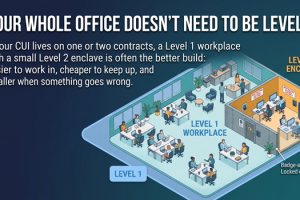
That's it. The "enclave" is the boundary. Everything inside the boundary is subject to CMMC Level 2 controls. Everything outside it stays under your existing CMMC Level 1 posture.
Inside vs. Outside the Enclave
- General email and collaboration tools
- Non-CUI staff and contractors
- Regular business devices (shared or personal)
- Standard business operations (invoicing, HR, etc.)
- FCI-only work (covered under CMMC L1)
- Dedicated CUI devices (Windows laptops or Chromebooks)
- Google Workspace for Government or M365 GCC High account
- CUI files, emails, and collaboration — enclave only
- Authorized CUI users — documented and access-controlled
- All CMMC L2 controls applied here
Notice what the enclave doesn't include: your entire company, your entire IT infrastructure, or anything beyond the specific systems where CUI lives. That scope limitation is one of the most powerful compliance strategies available to small contractors.
Why Isolation Is the Key Compliance Strategy
CMMC Level 2 includes 110 practices across 14 security domains. That sounds like a lot — because it is. But here's what changes the calculation for small businesses: those 110 practices only apply to systems that are in scope for CUI.
If your CUI environment is clearly defined and isolated from your general business systems, your assessment scope shrinks dramatically. You're not trying to apply enterprise security controls to every laptop in the company, every email account, every shared drive. You're applying them to a focused, bounded environment where CUI actually lives.
That's the entire logic behind the enclave approach. Contain the scope. Implement strong controls within that scope. Document everything inside the boundary.
Scope Containment in Practice
A contractor with 12 employees might handle CUI on only 2 or 3 specific projects. The CUI users might be just 2–3 people. Those users work on dedicated devices, using a dedicated government-tier platform login. The other 9–10 employees and their systems are simply outside the enclave — they're not in scope for L2 assessment at all.
Without an enclave approach, every system in the business could be considered in scope. With one, the assessment footprint is tight, defined, and manageable.
What's Actually Inside a CUI Enclave
Let's get concrete. For a small contractor implementing the enclave approach, here's what the environment looks like in practice:
Dedicated Devices
CUI users work on dedicated devices — Windows laptops or Chromebooks that are used only for CUI work. These devices are configured to CMMC Level 2 requirements: encryption enabled, screen lock enforced, specific security baselines applied. They don't browse the general internet, handle personal email, or run non-work software.
Overwatch Tools provides configuration guides for every supported device type. Clients implement the configuration on their own hardware — we provide the step-by-step instructions, not the devices themselves.
A Government-Tier Platform
The enclave uses either Google Workspace for Government or Microsoft 365 GCC High — not a standard business edition of either platform. These tiers provide the data residency, access controls, and compliance features required for CUI. This is a separate account from your regular business Google or Microsoft environment.
The choice between Google and Microsoft depends on your team's existing tools and preferences. Both are valid paths. A later blog in this series goes deeper on the platform comparison — for now, know that both options are fully supported by the L2 CUI Enclave Package.
Restricted, Documented Access
Access to the enclave is not open to everyone on your team. Only personnel who need CUI for their work have accounts. Those accounts are documented, access is controlled, and role-based permissions are applied. Joiners and leavers have a formal process.
Documented Procedures
The enclave isn't just a technical environment — it's a procedural one. There are written policies governing how CUI is handled, how devices are used, how incidents are reported, and how access is maintained. These aren't complicated enterprise documents; they're practical, right-sized procedures that reflect how your small team actually works.
No Enterprise IT Required
This is the point that surprises most small contractors when they first hear about the enclave approach. Let's be direct about what you don't need:
The L2 CUI Enclave Package is specifically designed for small businesses with limited CUI needs. If your CUI footprint is focused — a handful of users, a defined set of projects, dedicated devices — this approach is right-sized for you. No enterprise-grade IT complexity required.
⚠️ Self-Assessment Programs Only. The L2 CUI Enclave Package is scoped for CMMC Level 2 programs eligible for annual self-assessment. Programs required to use a C3PAO are not in scope. If you're unsure whether your program qualifies for self-assessment, a free 30-minute consultation is the right first step.
How the Enclave Sits on Top of Your L1 Compliance
One thing that trips up small contractors: the CUI enclave doesn't replace your CMMC Level 1 work. It sits on top of it.
Here's how to think about it:
- CMMC Level 1 covers how your general business handles Federal Contract Information (FCI) — the basic cybersecurity hygiene practices that apply across your entire operation.
- CMMC Level 2 (CUI enclave) adds a dedicated, controlled layer for the subset of your work that involves Controlled Unclassified Information.
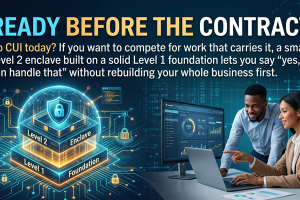
You need both. Your general systems stay under L1 rules. Your CUI environment gets the full L2 treatment. The enclave is the clear dividing line between the two.
The Full Compliance Picture
Overwatch Tools offers both packages as a combined path:
- L1 Turnkey Package ($2,495/year): 15 practices → 142 artifacts. Covers your general FCI environment. Most clients complete in 2–4 weeks.
- L2 CUI Enclave Package ($3,495/year): 110 practices → 182 artifacts. Platform-specific guides for Google Workspace for Government or M365 GCC High. No enterprise IT. Self-assessment only.
- Combined: $5,990/year — full coverage for contractors with both FCI and CUI obligations.
Is the Enclave Approach Right for You?
The free 30-minute consultation is the fastest way to find out. We'll walk through your CUI footprint, confirm your program's self-assessment eligibility, and explain exactly what implementation would look like for your situation.
Book Your Free 30-Minute Consultation →What the L2 CUI Enclave Package Provides
Once you've confirmed the enclave approach fits your situation, here's what the package delivers:
| Component | Details |
|---|---|
| 110 Practices → 182 Artifacts | Every CMMC L2 practice mapped to a defined, named artifact. No guessing what you need to produce. |
| Platform-Specific Configuration Guides | Dedicated CUI enclave configuration guides for Google Workspace for Government or Microsoft 365 GCC High. Step-by-step. You implement; we guide. |
| 12 Bi-Weekly Expert Consulting Sessions | 1 hour each. Keep implementation moving with expert guidance throughout the process. |
| System Security Plan (SSP) | Pre-filled SSP template — one of the most time-consuming documents in any L2 assessment. |
| POAM Framework & Risk Register | Structured templates for managing open findings and ongoing risk documentation. |
| SPRS Scoring & Self-Assessment Docs | Everything you need to score, document, and submit your self-assessment. |
| Free 30-Min Kickoff Consultation | Confirm scope, platform choice, and implementation path before you begin. |
The package is designed to be implemented part-time. Every task includes a time estimate so you can plan the work around your existing schedule. No full-time IT dedication required.
A Realistic Day-in-the-Life of the Enclave
Here's what working within the enclave actually looks like for someone on your team:
An authorized CUI user starts the morning. They pick up their dedicated CUI laptop (not their regular work machine), log in with their government-tier platform credentials, and open the specific project files they need — all within the enclave environment. When they're done, they log out. That's it.
For general email, invoicing, or non-CUI collaboration, they use their regular business tools on their regular device. The two worlds are separate — not because it's complicated, but because the procedures and device separation make it straightforward.
When it's time for a monthly maintenance review, your IT point person logs in, checks the audit logs, confirms access is current, and records the review. With time estimates on every task in the package, maintenance is planned work — not a surprise burden.
How to Know If You Need an Enclave
The core question is simple: Do you handle Controlled Unclassified Information under a DoD contract?
If your contract involves CUI — and your contract documentation or your contracting officer can confirm this — then CMMC Level 2 applies to your work. The enclave is the approach that makes Level 2 achievable for small businesses without a dedicated IT department.
The questions that matter most:
- Does your DoD contract reference CUI or DFARS clause 252.204-7012?
- Is your program potentially eligible for annual self-assessment (vs. requiring a C3PAO)?
- Is your CUI footprint limited — a defined set of users, projects, and devices?
- Are you using or willing to move to Google Workspace for Government or Microsoft 365 GCC High?
If most of those answers are yes, the enclave approach — and the L2 CUI Enclave Package — is likely the right fit.
A note on complexity: If your CUI environment is large, sprawling, or deeply integrated with legacy enterprise systems, the enclave approach may not be sufficient on its own. The L2 package is designed for limited CUI footprints. When in doubt, the free consultation will help you assess fit honestly — including if a different path makes more sense for your situation.
Start With a Conversation
The free 30-minute consultation is where we confirm your program's eligibility, map your CUI footprint, and walk you through what implementation would realistically look like. No pressure, no obligation — just a clear picture of where you stand and what comes next.
Book Your Free 30-Minute Consultation →Explore All Packages at Overwatch Tools →
Next in the Series: Platform Choice
The next post in the CMMC L2 Decision Series goes deep on platform selection — Google Workspace for Government vs. Microsoft 365 GCC High. What are the real differences, what does each require, and how do you choose?
Also check out: CMMC Level 1 vs. Level 2: Which Applies to Your Business? — the first post in this series, covering the FCI vs. CUI distinction and how to determine your compliance tier.
Overwatch Tools — CMMC Compliance Solutions for Small Defense Contractors
Chesapeake, Virginia | overwatchtools.com | info@overwatchtools.com
© 2026 Overwatch Tools. Making CMMC Compliance Achievable for Small Defense Contractors.