Right-Sized for Small Business: CMMC Level 1 and Level 2 Without Enterprise IT
No Active Directory. No SIEM. No full-time security team. If you've looked at CMMC and concluded it wasn't built for a company like yours — you're half right. Most of it wasn't. Here's the version that is.
Most CMMC guidance — at both Level 1 and Level 2 — quietly assumes you have an Active Directory environment, a SIEM platform, and a dedicated security team. The whitepapers assume it. The consultants assume it. The compliance frameworks were written with it in mind.
Most small defense contractors have none of those things. And most CMMC packages weren't built for them.
So when a contractor with eight employees and a Microsoft 365 Business subscription reads through a typical CMMC implementation guide, the reaction is almost always the same: "I don't have any of this. I can't possibly do CMMC properly."
That's a fair concern. It's also the wrong conclusion. The premise is correct — you don't have enterprise infrastructure. But the conclusion that follows from it is wrong, because CMMC at the scale most small contractors operate at does not require enterprise infrastructure. It requires something else entirely — and that something else is what this article is about.
"I Don't Have Enterprise IT" — The Right Concern, the Wrong Conclusion
Let's name the objection directly, because almost every small contractor we talk to is carrying some version of it:
- "We don't run Active Directory — we just have user accounts in Microsoft 365 / Google Workspace."
- "We don't have a SIEM. I'm not even totally sure what a SIEM is."
- "We don't have an IT department. We have one person who's good with computers, and a vendor we call when something breaks."
- "Everything I read about CMMC sounds like it's written for a company ten times our size."
Every one of those statements is true for a large share of the defense industrial base. The DoD's own estimates put the majority of contractors in the small-business category — companies with a handful of employees, modest IT, and no security staff at all.
Here is the part that matters: the concern is valid, but the conclusion doesn't follow. "I don't have enterprise IT" is true. "Therefore I can't do CMMC" is false. The reason it feels true is that most of the guidance you've encountered was written by and for organizations that do have enterprise IT — and that's a problem with the guidance, not with your business.
Why Most CMMC Advice Assumes Enterprise IT
This isn't a conspiracy. It's a side effect of where CMMC consulting came from.
The cybersecurity and compliance consulting industry grew up serving large organizations — prime contractors, defense agencies, and enterprises with thousands of endpoints and real security operations centers. When CMMC arrived, that same industry simply pointed its existing playbook at it. The playbook assumes Active Directory because the clients it was written for run Active Directory. It assumes a SIEM because those clients have one. It assumes a security team because those clients employ one.
So the advice that filtered down to small subcontractors was, in effect, enterprise advice with the price tag left on — $50,000-plus engagements, multi-month timelines, and architectures designed for organizations that look nothing like a five-person shop.
The actual CMMC requirements don't say "you must own a SIEM." They say you must be able to create, review, and retain certain records and demonstrate certain controls. Enterprise tools are one way to satisfy those requirements. For a small contractor with a focused scope, they are usually the most expensive and most complicated way — and almost never the only way.
What Both Packages Leave Out — On Purpose
Both Overwatch Tools packages were designed for the contractor who has none of the enterprise pieces. Here's what neither package requires:
No Active Directory
Modern Microsoft 365 and Google Workspace handle identity, access, and authentication natively. You don't need a domain controller you don't have.
No SIEM
Your cloud platform already logs access and admin activity. Documented review procedures turn those built-in logs into audit evidence — no SIEM platform required.
No Full-Time Security Staff
The role structure and per-task time estimates are built for part-time implementation by the people you already have, with our consulting to keep momentum.
This isn't a watered-down version of CMMC. It's the same compliance outcome — every required practice satisfied, every required artifact produced — built on the infrastructure small contractors actually have instead of the infrastructure enterprises assume.
CMMC Level 1 Without Enterprise IT
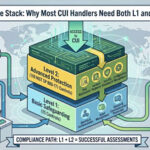
Level 1 covers Federal Contract Information (FCI) and maps 15 practices to 142 required artifacts. It's the floor for nearly every DoD contractor. And it's the easiest place to see how cloud-native identity replaces enterprise infrastructure.
Modern cloud platforms handle identity natively
The single biggest "enterprise" assumption baked into old CMMC guidance is Active Directory — the on-premises system large organizations use to manage user accounts, passwords, and access. Small contractors almost never run it, and the good news is they don't need to.
If your company runs on Microsoft 365 or Google Workspace, your identity layer is already built in. User accounts, multi-factor authentication, password policy, access control, account lockout, session management — the platform does all of it. The access-control and identification practices that Level 1 requires are satisfied through configuration you already have access to, not through a domain controller you'd have to stand up.
Platform-specific config guides do the technical work
The L1 Turnkey Package includes configuration guides written specifically for M365 or Google Workspace — not generic "enable security" advice you have to translate. Each guide walks through the exact settings, in the exact admin console, that satisfy each technical practice. The guides also cover the devices and networks small contractors actually use: Windows and Mac laptops, iOS and Android phones, and home-office or small-office networks.
Evidence comes from cloud-native tools, not a SIEM
Level 1 still requires you to demonstrate that controls are in place. The Evidence Locker approach uses the reporting and audit features already inside your cloud platform — admin reports, security dashboards, configuration exports — to produce the screenshots and records an assessor expects. No enterprise logging platform enters the picture.
Wondering if either package fits your environment? We'll look at your actual setup — no enterprise IT required to find out.
CMMC Level 2 Without Enterprise IT
Level 2 is the one that really sounds like it demands enterprise infrastructure. It covers Controlled Unclassified Information (CUI), maps 110 practices to 182 defined artifacts, and includes domains — audit, configuration management, incident response — that, in a large organization, would absolutely involve a SIEM and a security team.
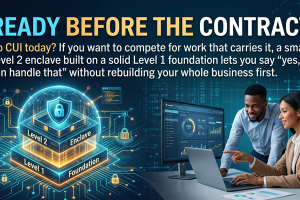
The thing that makes Level 2 feasible for a small contractor without any of that isn't a shortcut. It's an architecture: scope reduction through a dedicated CUI enclave.
Scope reduction is the whole game
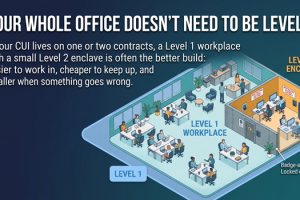
Instead of trying to make your entire company CMMC Level 2 compliant — every device, every account, every system — you create a small, isolated environment where CUI lives, and only that environment falls in scope. A handful of dedicated devices. A dedicated platform tier. A defined set of users. Everything outside the enclave stays out of scope.
This is the single most important strategic decision in small-business L2, and it's exactly the move that shrinks an enterprise-sized problem down to something a small contractor can actually implement. You're not securing a thousand endpoints. You're securing a small, bounded enclave designed for limited CUI needs.
Government-tier platforms handle enclave identity natively
For the enclave itself, you'll use Microsoft 365 GCC High or Google Workspace for Government — the platform variants authorized for CUI. Just like at Level 1, these platforms handle identity, authentication, and access control natively. No Active Directory required for the enclave; the government-tier cloud provides the identity layer.
Platform audit logs meet the SIEM requirement
The audit-and-accountability domain is where people assume a SIEM is mandatory. It isn't. GCC High and Workspace for Government generate detailed audit logs of access and administrative activity by default. Pair those built-in logs with documented review procedures — who reviews them, how often, what they look for, how findings get handled — and you've satisfied the requirement with evidence an assessor recognizes. The "tool" is your platform's logging plus a process. Not a six-figure security operations platform.
The enclave, in plain terms
A small, isolated set of dedicated CUI-only devices, running on a government-tier cloud platform, used by a defined handful of people, governed by documented procedures. That's the architecture that makes Level 2 work without enterprise IT — and it's exactly what the L2 CUI Enclave Package is built to help you stand up.
No SIEM Required — at Either Level
It's worth pulling this point out on its own, because the "you need a SIEM" assumption stops more small contractors than almost anything else.
A SIEM — Security Information and Event Management platform — aggregates logs from across a large environment and correlates them for threats. It's genuinely valuable when you have hundreds or thousands of systems generating millions of events. For a small contractor with a focused L1 environment or a bounded L2 enclave, it's overkill, and CMMC doesn't require it.
What CMMC requires is that relevant events are logged, retained, and reviewed. Your cloud platform already logs and retains. The piece you add is the review: a documented procedure that says who looks at the logs, on what schedule, and what they do with what they find. That documented procedure — not an enterprise platform — is what turns built-in logging into compliant evidence.
No Dedicated Security Team Required
You don't need to hire a CISO. You don't need a security operations team. Both packages are built around a role structure that maps to how small businesses actually operate — and every task carries a time estimate so the work fits around real jobs people already have.
The role structure (for L2; L1 is simpler)
- Owner / Manager — signs policies, makes approval decisions, and handles quarterly reviews. Often the business owner. This is a few hours a quarter, not a full-time job.
- IT Point Person — implements the technical controls, handles monthly maintenance, and collects evidence. This is the "person who's good with computers" you already have, working part-time against clear, time-estimated tasks.
- CUI User(s) — the people who actually handle CUI. They follow documented procedures, report incidents, and maintain basic awareness. No special technical skill required.
Notice what's missing from that list: a full-time security professional. The structure assumes the people you have, doing this part-time, with bi-weekly consulting sessions to keep momentum and answer questions. L1 clients typically complete their assessment in 2–4 weeks; L2 is designed to be implementable part-time, with time estimates on every task so you can plan around your actual workload.
What Enterprise CMMC Assumes vs. What These Packages Actually Need
Put side by side, the gap between the assumption and the reality is stark:
❌ What Enterprise CMMC Assumes
- On-premises Active Directory environment
- A SIEM platform for log aggregation
- A full-time security team or SOC
- Dedicated IT department
- Six-figure tooling and consulting budget
- Months of implementation runway
- Generic enterprise documentation you translate yourself
✅ What Both Packages Actually Need
- A Microsoft 365 or Google Workspace subscription (tier matched to your level)
- For L2: a few dedicated CUI-only devices (we provide config guides, not hardware)
- One part-time IT point person
- An owner who can sign policies and do quarterly reviews
- The bi-weekly consulting sessions in your package
- Part-time effort against time-estimated tasks
- Platform-specific templates and guides — already done for you
The Two Packages, Side by Side
Here's how each package delivers the "without enterprise IT" approach at its level:
L1 Turnkey Package
- No Active Directory, no SIEM required
- Built on M365 or Google Workspace native identity
- 15 practices → 142 required artifacts
- Platform-specific configuration guides
- 8 bi-weekly expert consulting sessions
- Evidence Locker + SPRS report
- Most clients finish in 2–4 weeks
L2 CUI Enclave Package
- No AD, no SIEM, no full-time security staff
- Scope reduction via a dedicated CUI enclave
- GCC High or Workspace for Government
- 110 practices → 182 defined artifacts
- 12 bi-weekly expert consulting sessions
- SSP, POAM, Risk Register, evidence checklist
- Time estimates on every task — part-time friendly
What You Actually Do Need
Honesty cuts both ways. "No enterprise IT" doesn't mean "no requirements." Here's the short, real list of what these packages assume you bring:
- The right platform subscription. M365 or Google Workspace for Level 1; GCC High or Workspace for Government for the Level 2 enclave. The tier has to match the level — that's not optional.
- Dedicated CUI devices (L2 only). A few Windows laptops or Chromebooks reserved for CUI work. We provide the configuration guides; we don't provide the hardware.
- A part-time IT point person. Someone comfortable following technical configuration guides — not a security expert, but someone who can work in an admin console.
- The consulting sessions. The bi-weekly sessions in your package are where momentum and accuracy come from. They're included; use them.
- Real implementation effort. We provide templates, guides, and consulting. Your team implements. There's genuine work here — it's just scoped to be doable part-time.
Who This Fits — and Who It Doesn't
We'd rather tell you the truth than make a sale you'll regret, so here's the honest scope statement.
This approach fits small contractors with limited CUI needs — a focused scope that can live inside a small enclave, a handful of users, and the willingness to implement part-time with guidance. For those businesses, the enclave-and-cloud-native approach is genuinely the right-sized answer, and it works.
If you're not sure which group you're in, that's exactly the kind of thing a 30-minute conversation sorts out. We'll tell you honestly — including "you need something else," if that's the answer.
The Real Takeaway
The reason CMMC feels impossible for small contractors is that the guidance you've been handed was built for someone else — for primes and enterprises with infrastructure you don't have and don't need. The premise behind your hesitation is correct. The conclusion isn't.
CMMC Level 1 and Level 2 are both feasible for small contractors. They just have to be built for them.
That's the entire idea behind both packages: native cloud identity instead of Active Directory, documented review procedures instead of a SIEM, a part-time role structure instead of a security team, and a tightly scoped enclave instead of an enterprise-wide project. Same compliance outcome. Right-sized for the business you actually run.
See If Either Package Fits Your Environment — Free
Bring your actual setup — your platform, your team size, your CUI scope, your deadline. We'll walk through whether L1, L2, or both fit, and exactly what implementation would look like without enterprise IT. 30 minutes, no pitch, no obligation.
If the honest answer is "you need a different solution," we'll tell you that too.
Book Your Free Consultation Explore Both Packages